
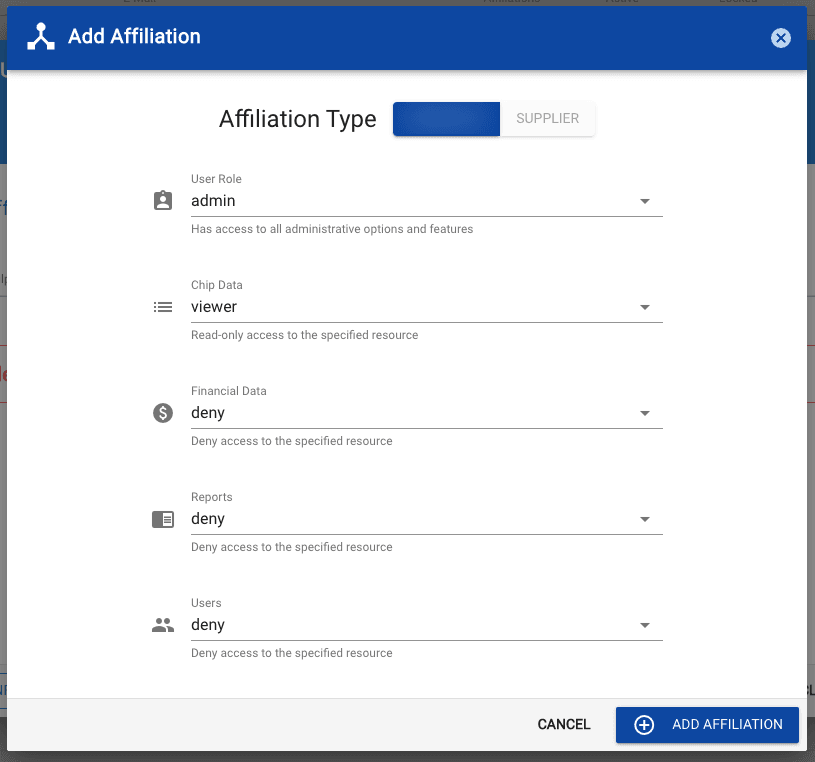
When managing your users it's important to understand the differences between user types and roles. The Chip Lab implements Role-based access control (RBAC) to manage access to every area of the service so that only the permitted users have access to areas or certain capabilities.
User Types:
- Owner - Similar to the Admin role, but can assign account ownership. Only one owner can be assigned per account.
- Admin - Has access to all administrative options and features.
- User - Standard user account. No administrative access.
User Roles:
- Deny - Deny all access to the specified resource
- Viewer - Can only view the specified resource (aka, read-only)
- Contributor - Can view and create the specified resource but cannot update or delete the specified resource
- Reviewer - Can view, or minimally update the specified resource - if applicable. (e.g. Sample Review - Hold / Approve)
- Editor - Can view, create, and update the specified resource
- Manager - Can view, create, update, and delete the specified resource
- Admin - Can view, create, update, and delete the specified resource and also has access to additional options and features
Note: Not all roles are applicable to all resources. For example, there is no "contributor" for report resources. However, since the contributor role is greater than viewer, it will inherit the ability to view reports.